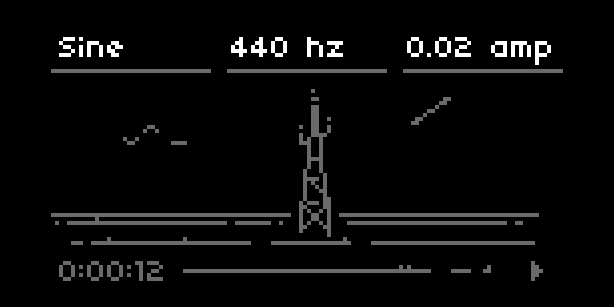
| project name: | dronecaster |
| project url: | https://github.com/northern-information/dronecaster |
| authors: | tyleretters, license |
| description: | cast drones & record whatever returns |
| discussion url: | https://l.llllllll.co/dronecaster |
| documentation url: | https://norns.community/dronecaster |
| tags: | synth drone generative |
dronecaster

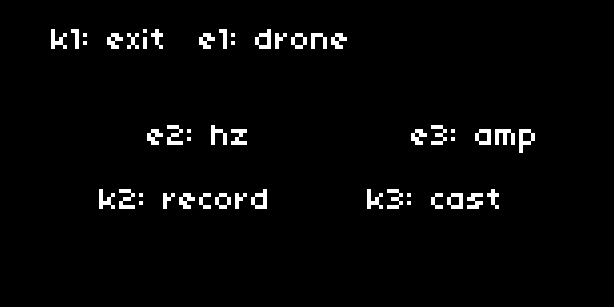
Installation
- Install via maiden or clone/download the repo to
dust/code. - Restart norns to pickup the SuperCollider Dronecaster engine.
- Drone!
Scene System
Dronecaster supports multiple visual styles while keeping audio completely unchanged.
Current Scenes
Classic - Original vector graphics (birds, wind, antenna, lights)
Mountain - Bitmap-based Mt. Zion scene with fog effects
Switch scenes: PARAMS > scene
Adding a New Scene
1. Create scene file: lib/scenes/yourscene/yourscene.lua
local yourscene = {}
yourscene.name = "Your Scene"

local mlrs, mls, screen_levels  -- utils from draw.lua

function yourscene.init(utils)
  mlrs = utils.mlrs
  mls = utils.mls
  screen_levels = utils.screen_levels
end

function yourscene.render(playing_frame, recording_time, drone_name,
                          hz, amp, playing, alt, alert, hz_num, amp_num)
  -- hz_num/amp_num are raw numbers (55.0, 0.4) - use these for animation
  -- hz/amp are formatted strings ("55 hz", "0.4 amp") - display only

  -- Your drawing code here
  screen.level(math.floor(amp_num * 15))
  screen.display_png("yourscene/assets/bg.png", 0, 0)
end

return yourscene
2. Register in lib/draw.lua → draw.load_scenes()
local success, yourscene = pcall(include, "lib/scenes/yourscene/yourscene")
if success and yourscene then
  local init_success, init_error = pcall(yourscene.init, utils)
  if init_success then
    scenes["Your Scene"] = yourscene
    table.insert(scene_names, "Your Scene")
    print("draw: loaded Your Scene")
  else
    print("draw: ERROR initializing Your Scene: " .. tostring(init_error))
  end
else
  print("draw: ERROR loading Your Scene file: " .. tostring(yourscene))
end
3. Reload - scene appears in PARAMS menu
Render Parameters
playing_frame- Frame counter (increments per second while playing)playing- Boolean, is sound currently playinghz_num- Raw frequency (e.g., 55.0) - animate with thisamp_num- Raw amplitude (e.g., 0.4) - animate with thishz/amp- Pre-formatted strings (display only)- Other params:
recording_time,drone_name,alt,alert
What Scenes Draw
Scene draws: Main visual area (artistic content)
draw.lua draws: HUD (top menu, clock, play/stop icon, alerts)
Graphics Tips
-- Bitmaps (must be grayscale PNG)
screen.display_png("path/to/image.png", x, y)

-- Blend modes
screen.blend_mode(0)  -- Normal (default)
screen.blend_mode(1)  -- Add
screen.blend_mode(6)  -- Darken (min of source/dest)

-- Brightness (0-15, no true alpha)
screen.level(15)  -- Brightest
screen.level(0)   -- Black

-- Layer by draw order
screen.display_png("bg.png", 0, 0)      -- Back
screen.display_png("fg.png", 0, 0)      -- Front (drawn last)
Folder Structure
lib/scenes/
├── classic.lua              # Original vector scene
└── mountain/
    ├── mountain.lua         # Scene code
    └── assets/
        ├── tower.png        # Bitmap assets
        ├── fg_00.png
        ├── fg_01.png
        ├── fog_gradient_wide.png
        └── fog_noise_line.png
Error Handling
Scene crashes won't crash dronecaster:
- pcall() wraps scene loading and rendering
- Errors logged to maiden with clear messages
- Fallback shows "SCENE ERROR" on screen
- Sound continues playing normally
Contribute
We need more SynthDefs! Join the discussion on lines: https://l.llllllll.co/dronecaster