
| project name: | seeker_ii |
| project url: | https://github.com/brokyo/seeker_ii |
| author: | awakeningsystems |
| description: | compositional interface for music, voltage, and video |
| tags: | grid arc midi osc crow |
Seeker II
Seeker II is an interface for writing and procedurally manipulating music and visuals. I originally wrote it on New Year’s Day 2025 to make Discreet Music-style phasing simple on a Norns. I’ve since spent the past year using it almost daily, slowly adding features whenever I found gaps between what I wanted to do and what Seeker could do.
Today it includes software instruments, a full sample chopping engine, a heavily parameterized tonal arpeggiator, a sequenceable motif transformation engine, extensive Eurorack control via I2C, a W/Tape Frippertronics effect, and TouchDesigner communication — all in cross-communication on a shared clock.
Seeker begins with eight musical lanes that run in parallel, each performing its own motif recorded on Grid. Those motifs can be procedurally transformed as the program loops, creating evolving music while maintaining structure and intentionality.
It continues with Grid/Arc UIs connected to modulation sources covering every way of moving through voltage I could think of: strums, bursts, LFOs, knob recording, random walks, non-linear distributions. If it’s a way of moving through numbers, it’s probably in there.
Seeker is intended to travel with you and scale to whatever you have on hand. It works as well in a studio with towers of modules as it does on a train with a Grid and a field recorder. I’ve been relentless about user experience, and I hope that despite its complexity, it’s easy to pick up and make something that helps you expresses how you’re feeling at that moment.
Open the next.
Requirements
Required - Norns - Grid
Recommended - mx.samples - Seeker's default engine is fantastic mx.samples from infinitedigits. If you purely want to use Eurorack it's not necessary, but so much of this script was designed with it in mind. - Arc — Seeker has a lot of configurability. Arc makes that configurability pleasant. Encoders 2, 3, 4 are mapped to different significant figures for high-resolution control and realtime performability of parameters. Everything works with out it but strongly recommended. - Seeker TouchDesigner tox — Seeker connects fairly naturally to TouchDesigner and enables a kind of visual painting that I think is a lot of fun, particularly with Arc. I've included toxs for each type of output. More on this further down.
Optional - Crow — Lots of CV and gate output patterns. Clock-synced modulation with some unusual approaches. - TXO — More CV and trigger outputs. And full polyphonic support for the TXO+ oscillators. TXO forever. - i2c modules — Control the playback and settings of Just Friends, W/Syn, and Disting EX - MIDI — external synths and DAWs
Installation
In Maiden:
;install https://github.com/brokyo/seeker_ii
Quickstart
When you first boot the app you will be on Lane 1 in Tape mode.
-
Select a voice — Open lane config (4A) to choose an output voice and configure its timbre. Click k3/the grid button on the Envelope param to edit visually.
-
Play notes — The 6x6 square in the center is a scale keyboard (2A). It's meant to make it easy to put your hands down and play something. Bright keys are root notes, each vertical step is 4 scale degrees, each horizontal step is 1. These steps can be configured later.
-
Record a motif — Hold the record button (5B). A metronome appears above the keyboard and a piano roll on the Norns UI. Play a phrase. Press the record button (5B) again to stop the recording. It will begin looping.
-
Overdub — Hold the record button (5B) again while the motif plays to overlay new notes. If you don't like your additions head to the clear button (5C) to erase a single overdub or the whole motif.
-
Add a transform stage — A phrase can be manipulated after an arbitrary number of loops across four stages. Click the second stage grid button (1A), turn the active param to 'on', and add transform to evolve the composition. The "Harmonize" transform is one of my favorite things in the app. Stack multiple stages. Compound changes to the motif or reset it in the "Config" section.
-
Try another lane — Select a new lane (4A). Record a complementary motif on a different instrument. Let the two voices phase against each other or offset playback speed on the playback button (5A).
Next Steps
The above sets a base but seeker is about more than tape loops. Try these
-
Composer mode — In Lane config (4A) select the Composer type to build an evolving arpeggio over four stages. Each stage is a chord who pattern, voicing, and phasing can be manipulated (1A) and played across configurable strum and velocity curves (2A). Connected to Eurorack you can play some really unusual things. Think of it as expressive strumming rather than rigid note playing.
-
Sampler mode — Seeker's looping structure works well with audio clips, particularly for glitching otherwise placid sounds. Select the Sampler type in Lane config (4a) and load a file or record from input. The 4x4 pad in the center (2A) will be loaded with equally-sized chopped segments from your original audio. Each pad has configurable envelope and filter. Try the "Pan Spread" transformation for engaging foley.
-
Eurorack integration — Seeker's precise clock and scheduled events lend themselves well to Eurorack effects. In Eurorack mode (3C) you can control Crow and TXO from audio-rate oscillation to 256 beat intervals. Made to send every kind of CV approach I could think of: standard stuff like LFOs, envelopes, noise, and clocks. But also more fun-to-write stuff like time-curved bursts, arc-recorded CV, looping random, or accumulative walks. I think you'll get totally new sounds out of things you think you know well.
Motif | Mode
The main performance space. Eight lanes run in parallel, each playing one of three motif types. Each type has its own keyboard and stage system.
All motif types share these controls:
- Lane Select (4A) — Choose lane and configure voices. Multiple voices can be active per-lane.
- Play (5A) — Control playback: offset pitch, change speed, quantize events, swing timing. Hold to play/stop.
- Create (5B) — Hold to record/generate. Tape records keyboard, Sampler records pads, Composer generates from parameters.
- Clear (5C) — Hold to erase the motif. If overdubbing you can select a specific generation to remove just that layer.
- Perform (5D) — Hold-to-activate Mute, Accent, or Soft with configurable slew time.
Tape | Motif Type
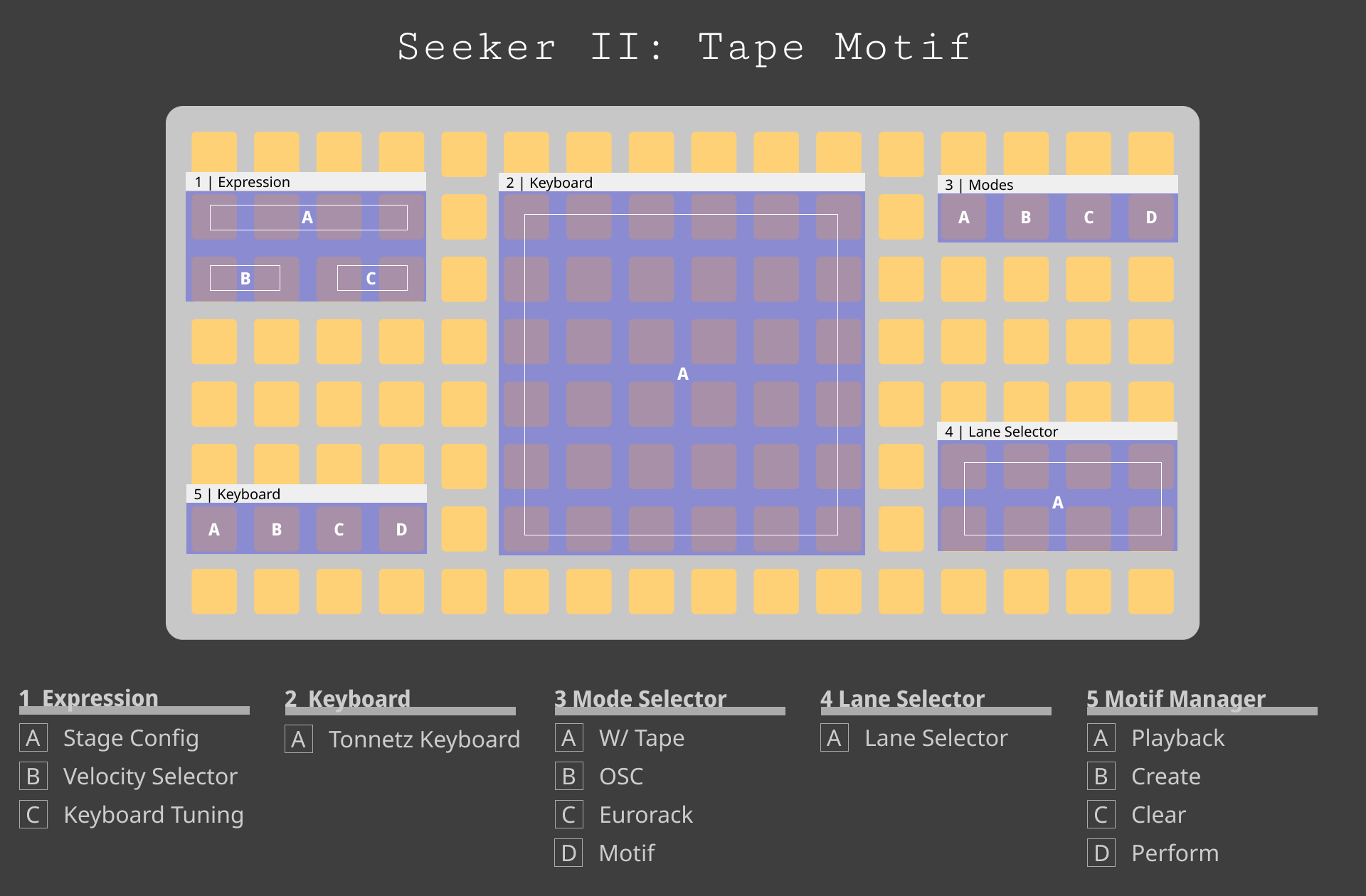
Record motifs on a 6x6 scale keyboard (2A) the note velocity buttons (1B) can help add dynamics as can the voice settings (4A). After recording, motifs can be overdubbed by holding Create Motif (5B). Motifs play through a configurable number of loops and then move to the next "Stage" (1A) where they can be algorithmically manipulated. Try setting reset motif in stage config (1A) to "no" to hear music compound. Scale and intervals can be set in Motif Config (3D).
Controls: - Stage Config (1A) — Configure transforms and loop counts. - Note Velocity (1B) — Two dynamic levels (low, high). Select from grid. - Keyboard Tuning (1C) — Octave up/down buttons to transpose the keyboard. - Dual Keyboard — Toggle the option in Create (5B) to split the keyboard into two zones with separate octaves.
Try: Play one rhythmic pulse and keep recording for awhile. Overdub several generations of harmony onto the loop. Then set Overdub Filter in Stage Config (1A) to selectively add and remove those overdubs.
Composer | Motif Type
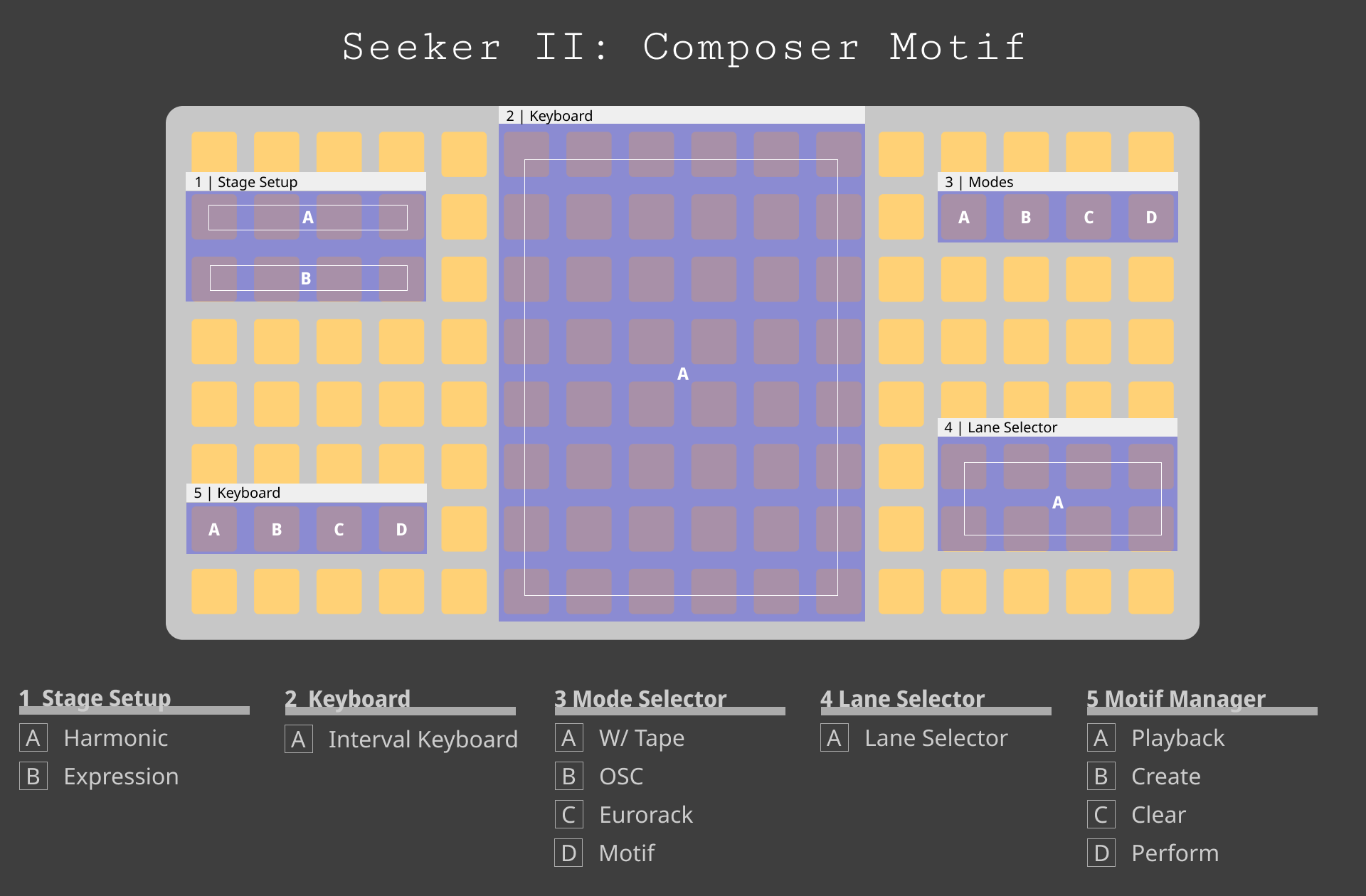
An algorithmic chord sequencer with a degree keyboard (2A) for visualization. Hold Create Motif (5B) to begin a sequence. The expression presets give a sense of possibilities but explore deeper by configuring their chordal content (1A) and play style (1B).
Controls: - Create Motif (5B) — Select expression preset and generate. - Harmonic Config (1A) — Per-stage chord root, type, length, inversion, octave. - Expression Config (1B) — Per-stage velocity curves, strum timing/shape, note duration, pattern filtering.
Try: Mismatch the number of steps (5B) with chord length and turn on phasing (1A). The chord will wrap differently every time adding even more variation. Try this with a Center Out shape (1B).
Sampler | Motif Type
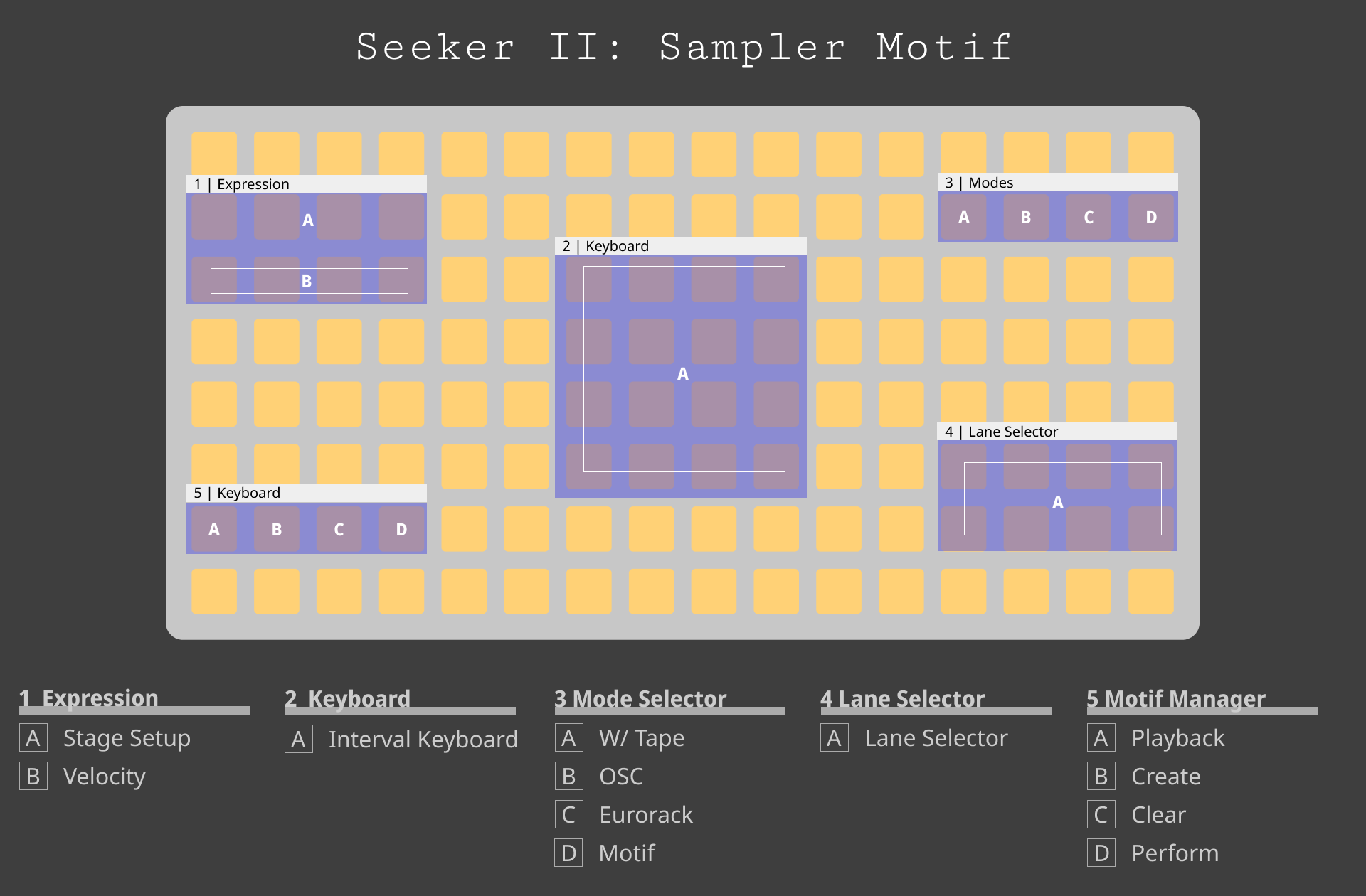
Load a sample or record from the Norns input. The sample will be chopped and distributed across a 4x4 pad grid (2A). Filter and envelope can be set for all pads (4A) or overwritten individually. Performances can be looped, overdubbed, and transformed. "Scatter" and "Slide" transformations (1A) manipulate the sample playhead and are very cool for textural work.
Controls: - Chop Config (1A) — Per-pad envelope, filter, pitch, pan, and rate. - Create (5B) — Record from Norns input or load a file.
Try: Load short samples of birds. Add a stage with Scatter.
Motif Voice Types
Tape and Composer can play the following voices. Each lane can output to multiple destinations simultaneously for interesting effects:
- MX Samples
- MIDI
- Crow/TXO (CV/Gate to eurorack)
- Just Friends
- W/Syn
- Disting EX (Multisample, Rings, Plaits, DX7)
- TXO Oscillator (with polyphony)
- OSC
Eurorack | Mode (3C)
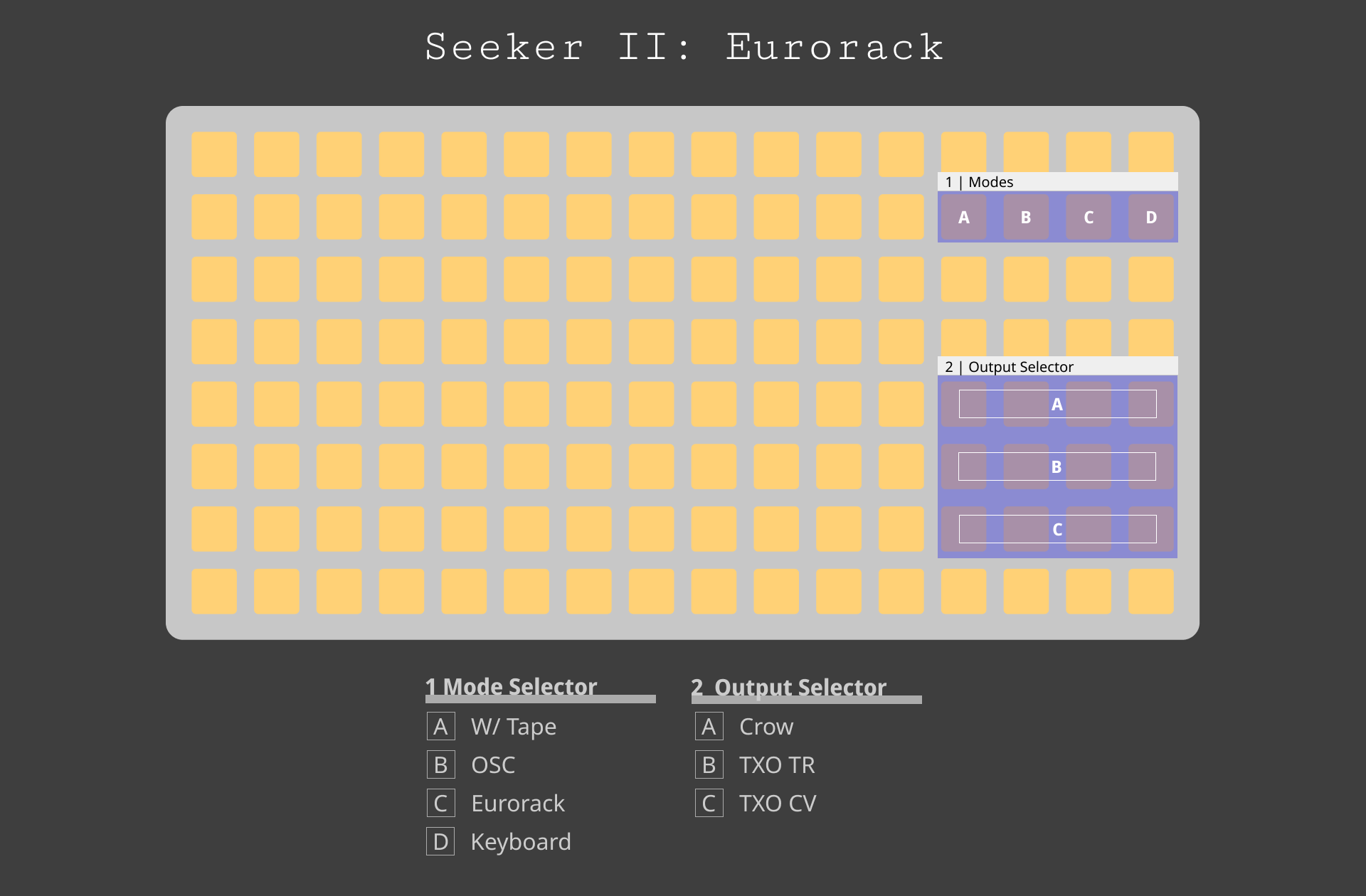
I find Seeker most interesting when it's directly communicating with Eurorack rather than just being played through it. Seeker supports the classic voltage and gate patterns but also has a number of more unexpected things I've found useful. Clock has a huge range and has brought a new perspective to how I use modular effects.
Trigger Types: - Clock — Tempo-synced triggers from 1/64 beat to 256 beats - Pattern — Step-sequenced triggers with configurable length - Euclidean — Euclidean rhythm generator with fill, length, and rotation - Burst — Rapid trigger bursts with count, timing curves, and acceleration
CV Types: - LFO — Tempo-synced waveforms (sine, triangle, saw, square, random) - Envelope — Clock-triggered envelopes with attack, decay, sustain, release - Knob Recorder — Record and loop Arc/encoder movements as CV - Looped Random — Random values that repeat after configurable length - Clocked Random — New random value on each clock tick - Random Walk — Accumulative random steps with configurable range
Try: Connect Looped Random to anything that takes CV that noticably affects sound. Pick eight steps and two loops. Quantize and set a small CV range. Voltage melodies.
OSC | Mode (3B)
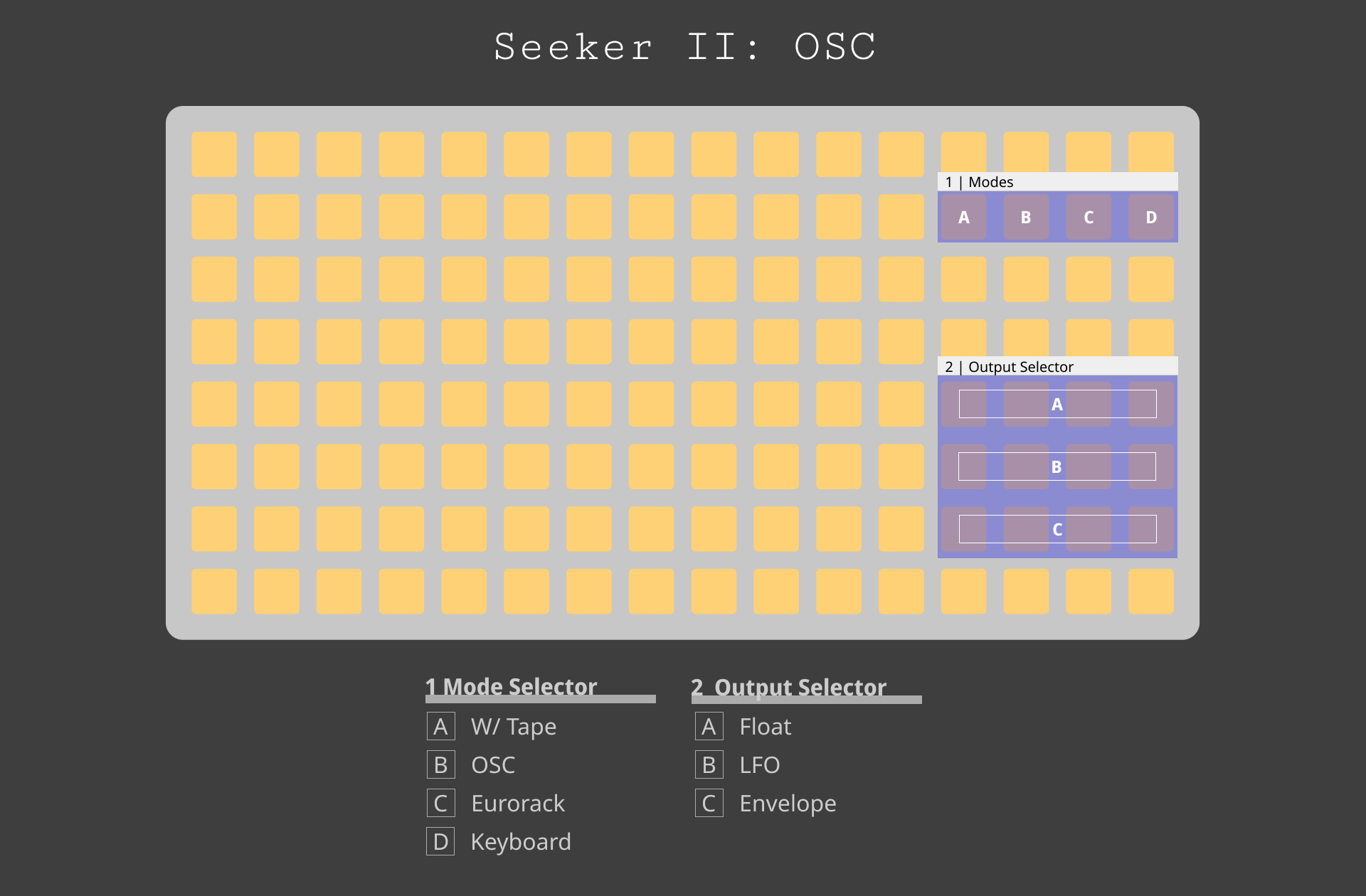
Alongside the Seeker II tox components you can directly manipulate param values in TouchDesigner and sequence them with the Norns clock and events. This is very interesting for Set the IP in the config menu (3B) and values should automatically show up in TD. Component preview window gives you a sense of values and their path.
Drag the .tox files into your project or My Components folder. Each component provides 4 CHOP outputs. I tend to connect them to null TOPs and reference those in parameters.
All work on a Norns but are much better with an Arc.
Float — Float Component Set float values through a base and multiplier. Useful for tuning images or performance.
LFO — LFO Component Tempo-synced lfos using stock TouchDesigner shapes. Set mix/max ranges for interesting parameter transformations.
Envelopes — Envelope Component Clock-driven triggers with TD-based envelope parameters. Cool with rhythms.
Try: Connect an envelope to the offset parameter on a noise TOP that's connected to a Displace TOP. Try slow triggers with long release times.
W/Tape | Mode (3A)
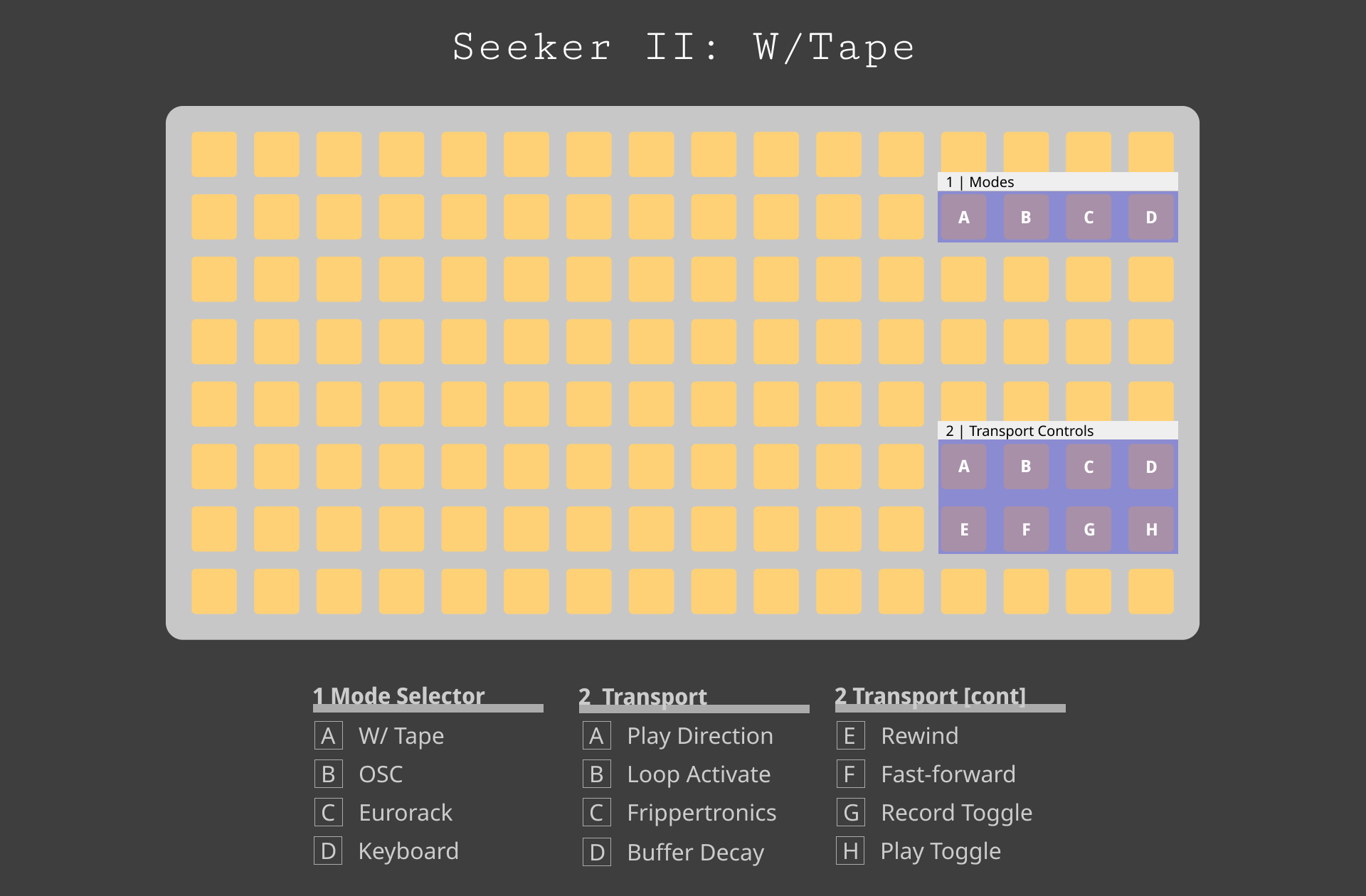
Transport control for the Whimsical Raps W/ module in tape mode with a particular focus on Frippertronics/buffer manipulation. Designed to act as a looper for foley or as a decaying delay.
I think this is such a cool module (the W/Synth used in Motif mode is amazing) and I shimmed in a bunch of convenience methods so you can focus on sound design rather than config.
Quickstart: Hold Frippertronics (2C) to mark loop start and begin recording. Perform, then press again to close the loop—playback engages automatically. Set Buffer Decay (2D) to control how quickly layers fade. Long-press Frippertronics to clear and start over.
Try: Mult a piano for MX Samples. Send one out to W/'s in port and record for two seconds. Connec the W/ out to an effect. Recombine the clean signal with the frippertronic/effect chain.
Settings | Mode (3D)
Global configuration: BPM, root note, scale, and MIDI clock settings. Tap tempo available. "Sync All" restarts all lanes and outputs simultaneously.
Transform Reference
Transforms modify motifs as they pass through four stages of a user-configurable number of loops. Each motif type has its own transform library. Set variations on a theme or change "reset motif" to off to compound the effects over time.
Tape Transforms
Harmonize — Layer harmonic intervals over notes. Sub-octave, fifth, and octave above with independent chance and volume. Timing and velocity are subtly humanized.
Echo — Cascading repetitions with decay. Each note generates quieter copies trailing behind it. Clock-synced timing. Direction moves echoes up or down the scale.
Drift — Subtle melodic variation. Notes randomly wander by scale degrees. Stability controls how much of the melody stays fixed (Very Low=25%, Low=50%, Medium=75%, High=90%).
Ripple — Repeats the entire phrase at a configurable delay, volume, and transposition. Great for atomsphere.
Overdub Filter — Filter notes by recording generation. Keep early layers, remove specific generations, or isolate the original.
Sampler Transforms
Scatter — Create micro-loops from your sample. Amount controls playhead drift, Size controls minimum chop length. Good for glitchy textures.
Slide — Shift the played audio from within the chop window. Optional wrap around buffer boundaries. Add variation to repeated sounds.
Reverse — Flip playback direction with probability per chop.
Pan Spread — Randomly offset pan position. Probability and range controls. Good for spatial movement.
Filter Drift — Progressively darken or brighten the filter across stages. Direction controls whether it opens or closes.
Composer Stages
Composer uses harmonic and expression stages rather than transforms. Each stage defines a chord and how it's played.
Harmonic Config — Chord root, type, length, inversion, octave, and voicing style per stage. Check out Chord Phasing in particular.
Expression Config — Velocity curves, strum timing and shape, note duration, and pattern filtering per stage. Shape creates very interesting effects with phasing.